Making Learning Connections w/ Legos By: Angela Moses

Image

Mrs. Moses’ 2nd Grade Classroom

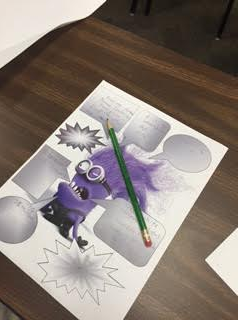
Have your ever thought of using Legos during your math lesson? You will literally have learning “connections” by bringing the use of Legos to a math classroom. I could almost use them in every lesson.  The students connect with this concept because they bring them from home, it’s visual, and it’s fun.  My next question to myself, as I often talk to myself, was how to integrate with technology???  A wonderful tech tool called I-nigma is used for QR barcode scanning.  The students were given addition and subtraction problems.  Each sheet had a problem and a QR code for the solution. They had to create/model the same problem with the Legos. The students scanned the QR code with I-nigma and checked to see if they were correct.  Modeled with Legos, solved, scanned, and instantly the students knew if they could move on or if they had to go back and check a step.  We moved through stations and answered 20 math problems.  The students were engaged and excited during the lesson.  QR codes and Legos can be used for multiple subjects.  Legos will bring many smiles to your classroom and learning connections will happen!

Geeky Grammar

Image

Have you heard about Augmented Reality? You seriously need to check it out! I was introduced to this concept one night last year when I couldn’t sleep. I was bored and had already surfed through Facebook and Pinterest, so I decided to check out that Twitter account that I was forced to make…Brad. I digress. When scrolling through my Twitter feed I saw an article that Erin Klein had tweeted out about Augmented Reality. I had no idea what it was. I decided that since I was wide awake, I would go ahead and read the article. I am glad I did. This is the night I fell in love with Twitter. I could not believe what Erin Klein was doing in her classroom with this thing called Augmented Reality. I wanted to be a student in her class! More importantly, I wanted to do this with my students. So I read. I studied. I learned. In one night I taught myself how to build Auras using Aurasma. The next morning I was in my superintendent’s office bright and early to show him what I learned on Twitter. Thank you Brad, my superintendent, for forcing me to get that Twitter account in the first place! After learning the awesomeness of Augmented Reality via Aurasma, I decided to design some lessons. The lesson shown in the picture is all about changing singular nouns to plural nouns.  This is a tricky concept for 4th graders when you start throwing in all the different rules. I wanted to make it real for my students. I wanted them to visually be able to see the changes, and not just on notebook paper.  I took words like daisy, baby, toy, cherry and boy and I created an Aura. When my students hovered their iPad over the singular form of the word, an image of the plural form automatically popped up. The students loved it, and so did I.  By the end of the unit we had several Auras posted around the room using the different rules. The good thing about Aurasma is that now that I have created these Auras, I can share them with other teachers in my school, or anywhere. Because students are holding the iPads in their hand, they are instantly engaged. They feel empowered as learners. It is an amazing thing to watch. Tomorrow they will be creating their very own Auras using homophones. Stay tuned for that one! Please keep in mind that this looks crazy hard to do, but I promise it is not. If you go to http://www.kleinspiration.com you will find Erin’s tutorial on how to make Auras using Aurasma. Take a look at it. Your students will think you are a  Rockstar!

A+ Communication

Image

Daisy Marino and Brett Kopf

Have you heard of Remind? Do you use it at your school or in your classroom? If not, you should!! Remind is an innovative and tech-savvy way to contact parents in a safe, 21st century way. I learned about Remind a little over a year ago, and I immediately knew that I wanted to implement it in to my classroom. I even introduced it to some of our teachers at our Warren ISD Tech Camp this summer. It was instantly a huge hit. Remind is the easiest way that I have seen to send out a message to multiple people. I mean let’s be honest, notes get lost between school and home, but with Remind the message goes straight to the parents’ cell phone. This weekend I had the honor to meet and hang-out with Brett Kopf. He is the co-founder and CEO of Remind. If I didn’t already love Remind enough, after sitting down with Brett and listening to his story on why the company was created made me love this company even more. I’m not going to tell that story here because it is not mine to tell….just know it’s amazing, and it will pull at the heart-strings of any educator. Here are a few ways that my school utilizes Remind:

  • Principal and assistant principal have a Remind account set-up to send our faculty reminders and any important updates
  • Instructional Technologist has a Remind for entire district to send reminders of tech workshops and free apps
  • Classroom teachers have Remind accounts for their homeroom classes
  • PE teacher has a Remind account to send notifications for her after school Family Fitness Nights
  • Club sponsors have Remind accounts to notify parents
  • Coaches send out motivational quotes as well as practice times
  • Superintendent has a Remind for his administrative team

Educreations & Augmented Reality

image

A few weeks ago, my students and I were deep into subject and predicates.  In the past I have always written sentences on the board and diagrammed them there.  We would then do worksheets.  Sometimes we would make up our own sentences and diagram them, too.  This year I wanted to change things up.  Make it a little more exciting.  This is what I did.  I had already printed the Planet AR Flashcards and was just waiting for a way to tie them into a lesson.  This was my perfect chance.  I had my students log on to Educreations on their iPads, and we took it from there.  With my iPad, the Apple TV, my SMART board, and the Planet AR FLashcards, we were on our way to a lesson that was sure to engage all my students.  I hovered my iPad over different planets.  When I did, the use of Augmented Reality made the objects 3D.  Simultaneously, the Apple TV was projecting these images on the SMART board for all my students to see.  The students then made up a sentence about the images that they saw. For example, the moon is made of cheese or Saturn has ginormous rings around it.  After they had a sentence written down, they then diagrammed the sentence into subject and predicate.  Essentially, I taught subjects and predicates the same way I had in years past; however, implementing technology made a huge difference.  The difference, every student was engaged and genuinely excited about what we were doing.  They wanted to make an “awesome” sentence so that I would airplay their iPad onto the SMART board for all the class to see.  I will definitely tweak this lesson in the future and use it again.  Give Educreations a try.  You can do so many things with it!

In My Perfect World

.Screen Shot 2014-09-27 at 6.34.37 PM

In my perfect world……

-All teachers would have the supplies that they need to impact every child

-Every child would come to school fed, bathed, clothed, and most importantly loved

-Teachers and children would be so immersed in learning during the school day that homework would not be needed

-Standardized tests would be banned

-All students would have access to technology at school and home

-Project Based Learning would be the norm; not the exception

-Collaboration and teamwork would supersede all other ways of doing things

-Thinking outside of the box would be applauded

-Someone would make all my copies for me

-Differentiated learning would be happening. For real.

-And above all else everyone would be kind to one another. All the time. No matter what.

Clearly a lot of these are not feasible, but what can I do this week to inch closer to my perfect world?

Moving beyond the Worksheet

It has been my mission the last two years to cut worksheets out of my classroom. I am not a fan, and neither are students. This means I have two choices: think outside of the box and plan something original or reach out to my PLN on Twitter or Pinterest. There are so many great ideas floating around out there, and I do not mind using them! This is why it is so important for teachers to share what they are doing. In my opinion quotation marks are one of the harder concepts that 4th grade needs to master. I used to do worksheet after worksheet after worksheet of quotation marks – never again. I have started thinking (and searching) for ways to teach quotation marks other than the worksheet. Here are a few ways that we have worked on them so far this year. The first picture you see is my white board. I put characters together in a box and told students to come up with dialogue between them. They loved this activity. I think it is better than worksheets for so many reasons. It’s fun. Students are able to be creative. They are writing their own sentences, which allows them to work on so many other concepts besides quotation marks as well. The kids could not wait to share the dialogue that they created.

Screen Shot 2015-06-26 at 10.33.53 AM

I am sure that y’all have seen this one. I call it Macaroni Quotation Marks. I found this idea on Pinterest last year, and once again my students loved it. I gave them their own bag of macaroni to keep this year. This way they can pull the macaroni out at anytime and work on quotation marks. Several students have been writing sentences on their individual dry erase boards and moving the macaroni around for commas as well. That was their idea not mine. This proves that if you allow students to work with engaging, hands-on materials they will start to think outside of the box all on their own. It’s amazing to watch.

Screen Shot 2015-06-26 at 10.34.04 AM

Another activity my students like to do is making up comic strips using quotation marks. This allows them a lot of creative freedom. They decide what they want to draw, say, etc. I like this because they are excited to do it. It does not seem like “work” to them. It is so much better than handing them a worksheet with quotation sentences on it to edit. This is engaging, it’s fun, and they are creating their own sentences, which once again covers more concepts than just quotation marks.

Screen Shot 2015-06-26 at 10.34.11 AM

The last activity we tackled this week targeting quotation marks was created on the app Write About This. We love this app because it can be used for so many different things. The students took a picture of their friend and uploaded it into the app using the custom prompt feature. They then had to create dialogue from their friend using quotation marks the correct way. Students love working on the iPads. They especially love emailing their finished products to their parents and teacher. This is a win win activity! This was the assessment for the week on quotation marks. It was easy for me to check their work from my phone or Mac Book. As a teacher these activities are so much better for me to check over than a worksheet. Sometimes I find myself cracking up laughing at things they have written. If I like these activities more than worksheets than how do you think my students feel? It’s time to step up our game, put in the work, and engage these learners.

Screen Shot 2015-06-26 at 10.34.18 AM

Now check out the picture below to see how awesomely hilarious my students are. Have an amazing outside of the box week!

Screen Shot 2015-06-26 at 10.34.26 AM

Connecting Community

Screen Shot 2015-06-25 at 6.56.57 PM

Tonight was an exciting evening for two of my students and myself. We were invited to present ways we use technology in the classroom at the board meeting. My girls were nervous, but they did a fantastic job. All the school board members were very impressed by what the girls did on the iPads. I tried to stand back and let them do the talking, but they were very shy tonight in front of so many unfamiliar faces. They were able to show school board members and administrators throughout the district how they make YouTube videos to provide supplemental learning for their peers. We make these videos once a week over new content that we are learning. We upload them on our class Twitter page and on our YouTube channel so that all students can access them from home. We also showed them the power of Augmented Reality, and the board members were amazed! I am so glad that we were able to show them what we were doing in the class with the technology that the community and district has provided us with. It is great to show the community exactly how technology is being utilized. They know we have it, and they know we use it in class – but for them to see my kiddos in action was an amazing moment for this teacher. We connect with students, teachers, parents, and administration, but are we connecting with all stakeholders in the district and community? Everyone matters, and the more people we have involved in our students’ education the closer we are to reaching our main goal of student success.