Sample Lessons- Writing

This post was sent to me by my sweet friend Andi McNair. She is a Gifted Education Specialist/Innovation Specialist at Bosqueville Elementary. I love this activity. Although it is very simple to implement, the concept promotes critical thinking and creativity.

Screen Shot 2016-03-17 at 8.43.19 AM


I absolutely love using writing prompts to get my students thinking when they enter my classroom each morning.  My favorite prompts can be found at photoprompts.tumblr.com.  This website is a collection of photo writing prompts that encourage critical thinking and creativity.  There are thousands of ready-to-use prompts that my students absolutely love.

We were recently learning about the Depth and Complexity icons and studying multiple perspectives.  While browsing through the prompts, I found this photo.

My students wrote the most creative stories and shared such great ideas.  The prompt provided them with an opportunity to see things differently and this helped them make connections in order to really understand multiple perspectives.

When my students come in each morning, I have the writing prompt projected onto the board.  I also share the image in Edmodo with them.   We use KidBlog to write our thoughts and share our stories about the writing prompts.  I ask them to upload the image from Edmodo into their blogs so that their audience will know what they are sharing about.  

These photo prompts are so easy to use.  Using them together with KidBlog makes it possible to go back to see the progress my students have made and how their writing has improved.  This also makes it easy to comment and share their ideas with an authentic audience.  

If you teach middle school or high school, you might find writingprompts.tumblr.com useful.  These are photo prompts as well but they include more detail and topics that are appropriate for older students.  

Both websites provide an alternative to boring journal prompts and essay questions.  The prompts engage students in a writing activity that encourages them to think outside of the box.   I am always looking for ways to provide my students with meaningful activities that not only address the standards but will also encourage creativity, collaboration, and critical thinking.  These photo prompts do just that!  

#momlife


Screen Shot 2016-03-06 at 8.58.42 PM

You’ve heard the term “Hot Mess Express”? I am pretty sure it was tattooed on my forehead as I walked into Sunday School [late] this morning. Nothing awful happened this morning; however, I just could NOT get it together. The dog. The dog hair. Need to sweep. Need to mop. Waking kids up. Feeding and dressing little humans. My Christmas tree is still up. (Insert embarrassed emoticon here)I was standing in my living room just looking around at every single task that needs to be completed and a huge, overwhelming panic started to creep in. The week’s agenda is huge (at least in my head). How is it all going to get done? Can someone else help me out? Can I please have a maid? I really just want to sit down and crochet.

And quicker than Blue Bell vanishing off the shelves after the 2015 recall – my bad attitude appeared.

Instead of focusing on the fact that I was about to go to God’s house and worship, and learn, and fellowship, I zoned in on all the negative. The to-do list. The laundry. The dishes. I have deemed this state of mind #momlife, and oh my goodness that encompasses so much. The negative energy takes over, and it absolutely engulfs you.  I didn’t focus on the fact that where I live I GET to go to church and worship. I wasn’t focused on the fact that I have the cutest kiddos – while some woman hope and pray for years for a child of their own. If I had to go back and hashtag myself it would be the following: #selfish #brat #ungrateful #getoveryourself. When this happens (because it is not just a one time thing) I pray, and I remember how much I need Jesus to take over my life and my mind. Every. Single. Day. More of him and less of me.

As I sat down in Sunday School I felt calmer. Although I had temporarily lost my mind, God quickly reminded me that he has this. It is all going to get finished. The to-do list will be checked off, and it is going to be a really good week – if I let Jesus take control and do his thing. I just need to do one thing, and that is to seek him first.

So moms, teachers, women of this world – say a prayer, exhale deeply, smile, and know that God has the whole world in his hands, even our mom “stress”. This week when you get aggravated, agitated, and inundated with all the little things just know that you are human, but God is not. You may be cranky, tired, and totally overwhelmed, but God isn’t. Seek him first. Call out to him ALL day long. Let others see him in you (not the cranky, crazy momma).

Screen Shot 2016-03-06 at 9.02.41 PM

Sample Lesson – 1st Grade G/T

My sweet friend, Terri Eichholz, sent me this awesome lesson. She created this lesson for her Gifted & Talented 1st graders. You could absolutely modify it for the grade level that you teach. If you would like to see more of Terri’s amazing lessons, check out her blog: http://www.engagetheirminds.com

Screen Shot 2016-03-01 at 1.22.54 PM

One of the more popular posts on this blog (particularly during the winter months) is, “If I Lived in a Snow Globe, I Would Wear my Bike Helmet to Bed.”  This is a follow-up post for anyone who might want more details about the lesson I teach my gifted 1st graders.  For this project, it’s helpful to have at least one iPad and a video editing program.

First, I show my first graders the “Bumbleville” video referenced in the Bike Helmet post, and we discuss the perspective questions I listed.  We also read Snow Globe Family and compared the book to “Bumbleville.”

Next, the students brainstorm a list of interesting locations.  They can range anywhere from the jungle to Mount Rushmore.

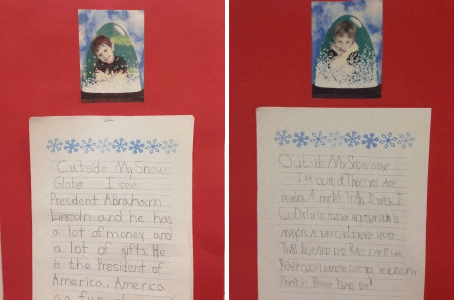
I ask the students to choose one location and pretend they are in a snow globe at that location.  They write a rough draft of a short story describing what they see outside the snow globe.

As students finish at different times, they take each other’s picture using the iSnowdome app, which is free.  The app places you inside a snow globe, and makes a short video with the snow blowing around you.  My students sometimes like to ham it up and pose as though they are freezing cold – even though we live in San Antonio and it’s usually about 85 degrees outside.

I also take screen shots in the app of each student so I can print those out and add them to their final drafts.  The screen shots can be used for augmented reality purposes, as well.

When the students complete their final drafts, they meet with me separately and we record their stories over the iSnowdome videos in iMovie on the iPads.  (Wow, that was a lot of “i”s in one sentence!)

In iMovie the students get to choose which music will accompany their video, and that’s always interesting!

I display the stories with their pictures.  At this point, you can either send the videos home, link them on your blog, or do what I did – use Aurasma.


Sample Lessons – 6th Grade Math

Ms. Wilson is absolutely one of the best teachers I have ever met. One of the traits that I love as a parent is her organization. Every student in Ms. Wilson’s class has an iPad. The way she integrates technology with organization for these students is top-notch. Maverick always has notes, and I can see his notes every night. If he has any problems that he is struggling with he can easily look back in his iPad at his saved notes.

“I take my lesson in SmartBoard and export to a pdf file. I attach the pdf file as an announcement in Google Classroom. The students open in Classroom and send to the app NeuAnnotate. They then take notes and work examples with me. The notes are then saved in either their Google Drive or iBooks – their choice.”

*Examples of what the notes Ms. Wilson send to the students before they annotate


Sample Lesson – HS History

The cool thing about my job is that I get to walk in all the classes in my district. You never know what you will see, what the teachers and the kids will be doing, and what great way the teacher is integrating technology [seamlessly] into the lesson that day. I walked in this classroom yesterday because a computer was being wonky. I noticed the kids were working intently on a project – of course I asked what they were doing. I thought

this was a really great idea. They are using technology, but they are also helping one another out by designing study guides and tests for different grade levels.

“Every year I have the sophomores, World History, take the released test from the previous year and combine the question with the correct answer. I then have them add a picture that relates to that topic. This process takes us about three days to complete. When I am through with that I then take the completed presentation and use it for a study guide for my Junior level U.S. History Class. Thereafter using it as a study guide I then turn it into a test on google forms so I will know what concept my students are not understanding right now! So I then have the test broken down into chapters and those chapters are broken down into packets that I hand out to the students as individual study guides that I take as grades.” -Michael Sanders

Presentation:

https://docs.google.com/presentation/d/1GmLD1OIqEfkOlVOvPxFMClXeVA-CBY7EtBXuvyw9m2w/edit?ts=56cf0476

The test formed from the review:

https://docs.google.com/a/warrenisd.net/forms/d/17Imd4XttHIofDgLQKI-7NhrGn3Bmgx4xAkY5TCbON18/viewform?c=0&w=1

This is an informative Review We have made as well for the EOC. This is not Q & A style just straight information.

https://docs.google.com/presentation/d/1sg83w4DRSaw6xr2bND4MWxiE9afkSrb0LgISW3Rjo7I/edit?ts=56cf0555#slide=id.g784c14b68_14_44

This is another informative Review that is done in chronological order! I have tried to reach all learning styles with the different types of reviews!

https://drive.google.com/a/warrenisd.net/file/d/0B5miqHXNiHFoSmlxY29KQThpMEE/view?ts=56cf05cc

Sample Lesson – 7th Grade ELA

I am in love with this lesson by Mrs. Abby Paben. This is her first year at WISD, and she brings a whole lot of awesomness. Her students love Nearpod. They love that they can see exactly what she is seeing on her screen. They also love that she is able to immediately see their corrections. Check out the following images. These are pictures of tweets that she dropped in Nearpod. Her students had to find the mistakes and make corrections. Not only did they look at incorrect tweets – they were able to look at correct sentences tweeted by none other than JJ Watt. After checking out celebrity tweets the students then corrected a few sentences that Mrs. Paben remotely sent them through the Nearpod app. I love Nearpod. If you are not familiar with it…you need to be!

*click on the pictures to make them larger

Sample Lessons- JH Art

We watched a short video on drawing eyes on WISD website:
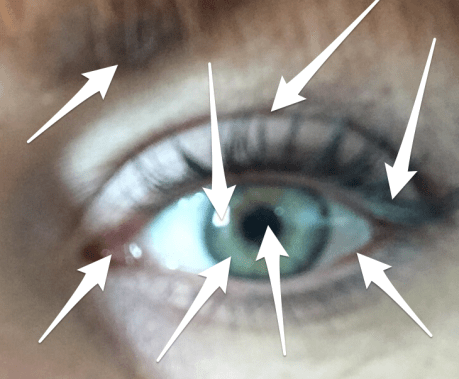
We started with the Skitch app. We took photos of our own eyes and talked about the basic anatomy of an eye.We then labeled them using Skitch. (We took an anatomy quiz later in the week).  Then we watched the drawing video and looked at some funny examples of the dos and don’ts of eyelashes and eyebrows. We also looked at what it looks like in real life if the lashes and brows are crazy (like kids tend to draw them when they are first starting out). Then the kids talked me through drawing one, and then I talked them through drawing one. Finally, they did one on their own… and they turned out great! This week we are doing lips and noses, which is fun too! All of this is in preparation for our “celebrity portrait” lesson we will start on after winter break.
 Screen Shot 2016-02-22 at 9.07.11 AM

Adulting is Hard

adulting

Y’all know it is. So many demands. The list. The list rules my world. The time crunch. Many afternoons I get home and just crash and burn. No strength left to do the laundry or the dishes or take the kids to the park. Often the mundane tasks of just daily life can take a huge toll on us. We become whiney. We start to believe that everyone and everything is against us. We become joyless. We walk around with a puckered up face like we are eating a lemon. It is shameful to admit, but I get asked (a lot) why I have such a bad look on my face. I truly didn’t realize that I did, but I am guilty as charged. I think I am just in a constant mode of deep thought. I am checking off the ever-growing list in my mind while simultaneously trying to think of new ways to change the world, you know?!

Then this morning a bible verse reached out and smacked me upside the head. You know what I mean. That’s what God does to get our attention when we are focused on too many other things.

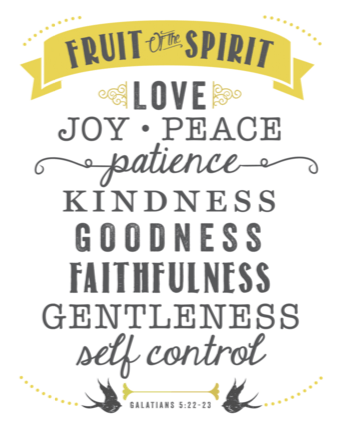
Matthew 10:8

“…freely you have received, freely give.”

And the conviction began. I instantly realized the state of selfishness that I often live in. How many times do I snap at people because I am stressed? How often do the people around me get the bottom of my barrel attitude? When I walk the halls of the school am I intentionally being a kind human being? Am I intentionally throwing joy around like confetti? Yikes.

When people push my buttons, step on that nerve, and just make me cranky…what is my reaction? How do I treat them? Do I disregard them and put my emotions and myself first? Yes, usually I do. However, Jesus said, “…freely you have received, freely give.” I am so underserving of everything he has given me, yet he gave. He gave freely. He gave regardless of how he felt day to day, and he did it without grumbling. He served the entire human race, always putting others first. He is looking down on us watching our every move. He doesn’t disregard us when we do the wrong thing or make a monumental mistake. He doesn’t give up on us. He is rooting for us. He isn’t rude or snide. He gives us another chance. HE is our biggest fan and our biggest cheerleader. This is one more reason why my prayer, my heart, my struggle is to be more like Jesus. Whether it is my family, my co-workers, the kids at school, or the babies in my AWANA group – please Jesus let me love them like you do. Don’t let me disregard them.

Life can be hard. It can be tiring. However, we were placed here to serve others. So serve joyfully. Kids deserve our best, and so do adults.

My challenge for myself –

The love that Jesus gives…freely give.

The grace that Jesus gives…freely give.

The mercy that Jesus gives…freely give.

The joy that Jesus gives…freely give.

The hope that Jesus gives…freely give.

The forgiveness that Jesus gives…freely give.

The patience that Jesus gives…freely give.


Learning. Surviving. & JAMF


Screen Shot 2016-02-01 at 10.14.11 PMSo, I have been quiet lately. Working harder than ever. Learning more than ever. The plan for the year was for Cherie and I to soak up every drop of knowledge that R.L. (builder & king of the Warren ISD technology movement) so kindly bequeathed upon us. Man, it was hard. Fast-paced and never ending. My brain hurt(s). He shook his head a lot at my lack of understanding (if you know him you are picturing this right now), but he had faith in me. He didn’t give up. He is absolutely one of the best mentors anyone could possibly have, and for that I am grateful. Most of this year I have been in survival mode with the words of Dori moving me along the way, “Just keep swimming. Just keep swimming.” Cherie and I have cried (a lot), we’ve laughed (a lot), we’ve failed (a lot), and we have learned (a lot). Through the past months there are four things that I have come to stand upon as truths and hope for the future of the Warren ISD Technology Department: R.L. built an amazing foundation for Warren ISD that will last for decades to come, Cherie can seriously figure out anything (genius level), I love to learn and get to learn new things every single day, and that the previous combination will ensure that Warren ISD will continue to grow in the area of technology.

One new endeavor that Cherie and I have been working endlessly on is a way to help teachers alleviate some of the stressors that come with having twenty students in a classroom with the world at their fingertips, which sometimes can be a good thing – and sometimes it can be a [bad] thing. Without using a bunch of technological jargon that makes me sound a lot more intelligent than I am – let me talk about our latest venture. We have purchased a management system for our school’s iPads called JAMF. In short, JAMF can help schools inventory, deploy, and secure each iPad that they have purchased with ease. We knew going into this project that it would be a huge undertaking. We also knew that it would be well worth it. Once we have completed the initial push the whole process of iPads will become smoother for us and for the teachers. When we decided to go ahead with JAMF we looked at the system from two points of view: the teachers and the students.

1.Teaches have a job to do, and they are incredibly passionate individuals that work hard and spend long hours planning out how to execute the perfect lesson for their students. Teachers are preparing future community members, doctors, engineers, etc. for a world that is in a constant state of change. We have TEKS and curriculum and testing and the list goes on and on. And more often than not, we feel like there just is not enough time in the day to get it all completed. Teachers need students to be focused on schoolwork during class time so that they can be successful; however, we gave the students iPads, which made them privy to social media and games and videos. Thus, taking their minds off of class work and on to more “interesting” subjects. Teachers need students to pay attention, so that they are able to prepare them for their future. After all, Snap Chatting the class period away won’t get you an A on an exam. The quote “There is a time and place for everything” rings true. A time to learn and a time to pin. A time to test and a time to “selfie.” I digress.

2. We want learning to be fun. We want to capture students’ attention. We want them to be creative, out of the box thinkers. So, we give them an iPad. We want them to WANT to use the iPad. We want the iPad to enhance their learning in a way that will prepare them for this crazy technology-driven world that we live in. We want learning to be at their fingertips. We do not want them to hate the iPad, so we (the tech department) are adamant that students do not lose their freedom per say. We don’t want to take their app store away, or their music, or their games. If we did then the iPad would merely be a textbook. They would not take ownership of the iPad. We want students to become good digital citizens. We want to teach students to make the right choices. We don’t want to make the right choices for them. So, we left the app store and the music and the social media. Because these things are not bad. They just need to be used (and taught) appropriately. Because “There is a time and a place for everything”.

So, the solution that we found is JAMF. This allows teachers to “Focus” students in on one thing at a time. If a teacher decides that students need to work in Google Slides for the class period then JAMF will allow this to happen. No straying to Instagram or Pinterest while you should be working on a project. However, when students leave that class and go to lunch, or home, or to the library they can then access their music and games and apps. They are free to dream big on Pinterest or design their dream country on Minecraft. It seems to be the perfect medium for teachers and students.

We are still working out the kinks and learning more about this program every single day. We are anticipating it to be a successful new component to the WISD Technology Initiative. We will certainly let you know.